Fast Food 3D SVG Multilayer Laser Files: A Creative Tool for Wall Art and More
If you're looking to elevate your crafting projects, the Fast Food 3D SVG Multilayer Laser Files offer a unique and versatile option. Designed with precision and creativity in mind, these laser files are ideal for those who want to produce intricate 3D wall art or decorative pieces using materials like plywood, acrylic, or cardboard. With a standard size of 290 H x 225 W mm (11.4 x 8.9 inches), this design provides a solid foundation for both hobbyists and professionals alike.
Understanding the Layers and Structure
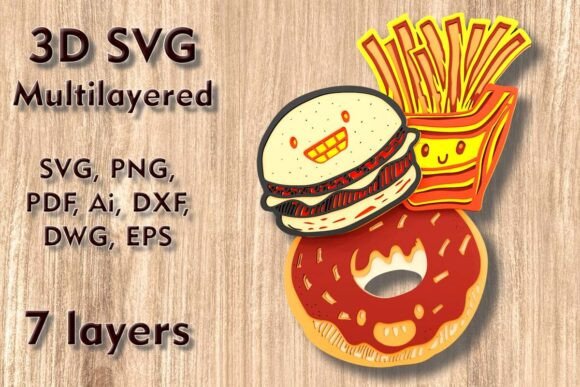
This design is composed of seven distinct layers, each playing a role in building the final 3D structure. These layers are meticulously crafted to ensure that when assembled, they form a detailed and visually appealing representation of fast food elements—think burgers, fries, soft drinks, and more. The layering technique allows for depth and dimension, making it perfect for eye-catching home decor or event displays.
It's important to note that while the design can be scaled up without significant issues, reducing its size should be done cautiously. Thin elements might become too delicate if the dimensions are shrunk too much, potentially affecting the structural integrity and visual appeal of the final product.
Supported Materials and Machines
The beauty of these laser files lies in their adaptability. They work well with various materials including:
- Plywood
- Cardstock
- MDF
- Wood
- Acrylic
- Cardboard
- Aluminum
This flexibility means you can choose the material best suited for your project and budget. Whether you're cutting with a Cricut, Silhouette, Glowforge laser cutter, or CNC router, the Fast Food 3D SVG Multilayer Laser Files are compatible with all major file formats such as SVG, DXF, DWG, EPS, AI, PNG, and PDF. After purchasing, you’ll receive a ZIP folder containing all these formats, ensuring seamless integration into your workflow regardless of the machine you use.
Applications and Uses
These laser-cut designs have a wide range of applications, from personal home decor to commercial signage. Here are some popular uses:
- Wall Art: Create a fun and modern piece for your kitchen or dining room. The multilayer effect adds texture and depth, making the artwork stand out.
- Event Decor: Use them at restaurants, cafes, or themed parties to add a playful touch. Fast food-themed decorations are always a hit with kids and adults alike.
- Gifts and Cards: Cut smaller versions for personalized cards or gifts. They can also be framed as unique presents for food lovers.
- Commercial Projects: Business owners can utilize these designs to create branded merchandise or point-of-sale displays.
Why Choose This Design?
There are several reasons why the Fast Food 3D SVG Multilayer Laser Files are becoming a favorite among crafters:
- High Detail: Each layer is designed with fine lines and curves, capturing the essence of fast food items accurately.
- Easy Assembly: Once cut, the layers can be stacked and glued together following clear instructions, simplifying the creation process.
- Customization Options: Since the design is available in multiple file formats, you can easily modify colors, sizes, or even combine it with other SVGs to suit your style.
- Compatibility: Works with most digital cutting machines, allowing users to leverage existing tools without additional investment.
Real-World Scenarios
Let’s take a look at how real users have applied these files in practical ways:
A local coffee shop owner used the Fast Food 3D SVG Multilayer Laser Files to create a custom menu board made from birch plywood. The layered design allowed her to showcase different food items in a stylized, three-dimensional layout that drew customer attention and enhanced the overall ambiance of the store.
An amateur crafter used the same design on thick cardstock to make a set of holiday cards featuring festive fast food themes. By printing the layers separately and assembling them, he achieved a professional finish that surprised friends and family with its quality and charm.
In another case, a school teacher incorporated the design into a classroom activity where students created mini fast food models using recycled cardboard. It was an engaging way to teach about sustainability and design principles while encouraging hands-on learning.
Strengths and Limitations
Like any creative tool, the Fast Food 3D SVG Multilayer Laser Files come with their own set of strengths and limitations. On the plus side, the high level of detail makes them ideal for showcasing craftsmanship, and the compatibility across platforms ensures accessibility for a broad audience. Additionally, the layered approach allows for customization and creativity in color schemes and assembly techniques.
However, there are some things to consider before starting your project:
- Material Thickness: Using the correct thickness for each material is essential to maintain the design’s balance and prevent warping or misalignment during assembly.
- Cutting Precision: The success of the final product heavily relies on the accuracy of the cutting machine. Ensure your device is properly calibrated to handle the intricacies of each layer.
- Assembly Time: While the individual layers are easy to cut, assembling seven layers may require patience and a steady hand, especially if you're aiming for a polished result.
How to Evaluate Suitability for Your Project
Before purchasing the Fast Food 3D SVG Multilayer Laser Files, it's wise to evaluate whether they align with your project goals and resources. Ask yourself the following questions:
- Do I have access to a laser cutter, CNC router, or compatible cutting machine?
- Am I working with a material that fits the recommended list (plywood, MDF, cardboard, etc.)?
- Will my space accommodate the full size of the design, or do I need to adjust it accordingly?
- Do I have the time and skill to assemble a multi-layered design?
Answering these questions will help you determine if this design is the right fit for your needs. For beginners, it's recommended to start with thicker cardstock or paper to ease the assembly process. Advanced users might prefer working with wood or acrylic for a more durable and sophisticated outcome.
Getting Started with Your Design
Once you’ve downloaded the ZIP folder, you’ll find all necessary file types ready for use. If you’re new to layered SVG designs, here are some quick tips to get started:
- Review the included PNG and PDF files to visualize how the layers align before cutting.
- Use your preferred software (such as Adobe Illustrator, Cricut Design Space, or Silhouette Studio) to open the SVG or layered SVG files.
- Ensure your machine settings are adjusted for the specific material you're using to avoid burning or incomplete cuts.
- After cutting, carefully stack the layers and apply adhesive to secure them in place.
With practice, you'll learn how to optimize each step for efficiency and accuracy, making the process smoother over time.
Where to Find Inspiration
If you're unsure how to incorporate the Fast Food 3D SVG Multilayer Laser Files into your next project, consider browsing online crafting communities or social media platforms like Pinterest and Instagram. Many creators share finished projects, assembly tutorials, and variations of the design that can spark new ideas. You might discover a way to turn the design into a mobile display, shadow box, or even a functional tray for small kitchen items.
Final Thoughts
The Fast Food 3D SVG Multilayer Laser Files are more than just a template—they're a gateway to exploring the intersection of technology and creativity. Whether you're a seasoned artisan or just beginning your journey into laser cutting and digital design, these files provide an excellent opportunity to expand your skills and bring fresh, vibrant ideas to life. Just remember to plan your project carefully, especially when adjusting the size, and enjoy the process of transforming flat layers into something truly special.