Jellyfish 3D SVG Multilayer Laser Files: A Guide to Crafting Stunning Wall Art
For crafters, artists, and DIY enthusiasts, the Jellyfish 3d SVG Multilayer Laser Files offer a unique opportunity to create intricate and mesmerizing 3D wall art or decorative pieces. Designed for use with cutting machines like Cricut, Silhouette, Glowforge laser cutters, and CNC routers, these files allow you to bring the beauty of underwater life into your home decor in a way that’s both artistic and technically precise.
Understanding the Jellyfish 3D SVG Design
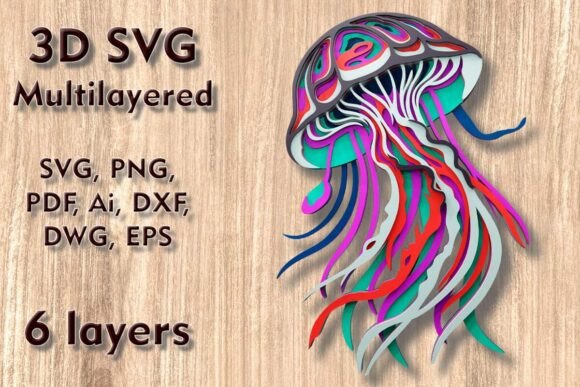
The Jellyfish 3d SVG Multilayer Laser Cutting Files are composed of six distinct layers, each contributing to the depth and visual impact of the final piece. The standard size is 9.85 inches in height by 7.09 inches in width (or 250 x 180 mm), making it ideal for wall hangings, shadow boxes, or layered cards. While the design can be easily scaled up without compromising quality, scaling down requires careful attention to avoid distorting delicate elements such as tentacles or body details.
This versatile SVG file works with various materials including:
- Plywood
- Paper and Cardstock
- MDF (Medium-Density Fiberboard)
- Wood
- Acrylic
- Cardboard
- Aluminum
Whether you're working on a small project or an elaborate display, this jellyfish design adapts well to different mediums and machine capabilities.
Common Mistakes When Using Jellyfish 3D SVG Files
Many users overlook key considerations when working with multilayered SVG designs, especially if they're new to laser cutting or crafting with digital templates. Here are some common pitfalls and how to avoid them:
1. Underestimating the Importance of Layer Order
One frequent mistake is not arranging the layers correctly before cutting. Since the jellyfish has six layers, their order determines the final look and structural integrity. Misplacing a layer could result in parts not aligning properly or the overall effect being less dramatic than intended.
Better Approach: Always review the provided instructions or layer organization guide. If none is included, start from the backmost layer and work forward, ensuring that smaller or more detailed pieces are placed last for easier assembly.2. Incorrect Material Thickness Selection
Choosing the wrong material thickness can lead to warping, misalignment, or difficulty in assembling the layers. For example, using thick acrylic might require stronger adhesives and longer drying times, while thin cardstock may tear during handling.
Better Approach: Match the material thickness to your project's needs. Beginners often find success with 3mm MDF or thick cardstock. Thinner materials are better suited for lightweight displays or portable gifts, while thicker woods or acrylics make durable, eye-catching wall art.3. Overlooking Machine Compatibility
Not all SVG files are created equal. Some are optimized for one type of machine but may not perform as expected on another. The Jellyfish 3d SVG Multilayer Laser Files are designed for laser and CNC machines, which means they may not function seamlessly on basic die-cutting devices without modification.
Better Approach: Check the compatibility of your machine with the file formats included in the download. This package includes SVG, DXF, DWG, EPS, AI, PNG, and PDF files, giving you flexibility across platforms. If unsure, consult user forums or reach out to the seller for guidance specific to your equipment.How to Scale the Design Safely
Scaling is a powerful feature, but it must be handled with care. Increasing the size of the Jellyfish 3d SVG Multilayer Laser Files is generally safe and can enhance the visual presence of the artwork. However, reducing the size can cause issues, particularly with thin or delicate elements like the jellyfish’s tentacles or fin-like structures.
Tip: When resizing the design, always preview the layers at the new scale. Look for any sections that become too fragile or overlap incorrectly. You may need to manually adjust certain elements or opt for thicker materials if you’re shrinking the design significantly.
File Formats Included and Why They Matter
After purchasing the Jellyfish 3d SVG Multilayer Laser Files, you’ll receive a ZIP folder containing multiple file types: SVG, DXF, DWG, EPS, AI, PNG, and PDF. Each format serves a purpose and caters to different workflows and machines:
- SVG – Ideal for most cutting machines due to its vector-based structure.
- DXF/DWG – Best for CNC routers and precision laser cuts.
- EPS/AI – Preferred for Adobe Illustrator users who want to edit or customize the design.
- PNG/PDF – Useful for reference images or print guides to help with placement and assembly.
Having access to these formats ensures you can work efficiently regardless of your preferred software or hardware setup.
Best Practices for Assembling and Displaying Your Jellyfish Art
Once you’ve cut all six layers, the next step is assembly. Proper technique here is crucial to achieving a clean, professional finish. Many beginners try to glue everything together quickly, only to find the layers don’t fit perfectly or the adhesive causes warping.
- Use a Lightbox or Tracing Paper: Lay out the layers on a light table or trace them onto a sheet of tracing paper to ensure accurate alignment before gluing.
- Select the Right Adhesive: Double-sided foam tape or wood glue are excellent choices depending on the material. Avoid heavy glues that can seep through and damage fine details.
- Allow Time for Drying: Rushing the process can lead to misaligned pieces or weakened joints. Follow the recommended drying time for your chosen adhesive.
Realistic Applications and Project Ideas
These Jellyfish 3d SVG Multilayer Laser Files open the door to creative possibilities beyond just wall art. Consider these ideas:
- Home Decor: Hang the finished jellyfish as part of a gallery wall or place it inside a shadow box for a 3D effect.
- Gift Boxes or Cards: Use thinner materials to create elegant 3D pop-up cards or festive gift box embellishments.
- Classroom Projects: Educators can incorporate the jellyfish design into STEM or art classes to teach about marine biology and design techniques.
- Entrepreneurial Products: Craft sellers can produce limited-edition wall art kits using these files, offering a unique product line with minimal effort.
What to Check Before Purchasing or Using the Files
To ensure a smooth experience, consider the following factors before buying or starting your project:
- Machine Type: Confirm whether your device supports layered SVG or vector files. If not, look for compatible alternatives within the ZIP folder.
- Material Suitability: Review the list of recommended materials and match them with your available supplies and desired outcome.
- Layer Clarity: Inspect the individual layers in the PDF or PNG previews to understand how they interlock and where adjustments may be needed.
- Assembly Difficulty: Assess your comfort level with multi-layered projects. If you’re new to this style, practice with simpler designs first.
Final Thoughts on Elevating Your Crafts
The Jellyfish 3d SVG Multilayer Laser Files are more than just a template—they’re a gateway to elevating your crafting skills and creating memorable pieces. By understanding the nuances of scaling, layering, and material choice, you can avoid common mistakes and maximize the potential of this beautiful design.
Whether you're a seasoned crafter or just getting started, taking the time to plan your project and follow best practices will lead to satisfying results. These files are a great investment for anyone looking to add dimension and artistry to their creations with minimal hassle.
So go ahead—unlock the magic of the ocean with every cut and transform your space into something truly enchanting.