Valentines Day Stickers 3D SVG: A Guide to Choosing and Using Them Effectively
Valentines Day Stickers in 3D SVG format are becoming a popular choice for crafters, small business owners, and digital designers looking to create eye-catching, dimensional graphics for cards, gifts, and promotional materials. These stickers offer a unique way to add depth and visual interest to your Valentine's Day projects, whether you're designing for personal use or commercial purposes. However, while the appeal of 3D SVG stickers is clear, there are several nuances that users often overlook—especially when it comes to materials and machine compatibility.
Understanding Valentines Day Stickers 3D SVG
SVG stands for Scalable Vector Graphics, a file format commonly used in digital design because it maintains clarity at any size. When paired with 3D effects, these stickers can simulate raised text or images, giving them a tactile and visually striking appearance. The 3D aspect typically involves layered vector paths that allow for precise cutting and layering when printed on compatible materials.
Many creators choose 3D SVG stickers for their versatility. They can be easily edited using design software like Silhouette Studio or Cricut Design Space, allowing for customization in colors, sizes, and even the addition of text. These files are also convenient to store and share, especially since they’re available in compressed folders for easy download and organization.
Choosing the Right Material: Why Adhesive Vinyl or Decal Paper Matters
One of the most common mistakes people make when working with 3D SVG stickers is underestimating the importance of the base material. While it may be tempting to print directly onto regular paper or cardstock, this can lead to poor adhesion, wrinkling, or damage during application.
The recommended base layer for 3D SVG stickers is either adhesive vinyl or decal paper. Both materials are specifically designed for sticker creation and ensure that the final product sticks well, lasts longer, and looks professional. Adhesive vinyl offers durability and flexibility, making it ideal for surfaces like mugs, laptops, and phone cases. Decal paper, on the other hand, is great for smooth surfaces and allows for easy weeding and placement after printing.
Using non-adhesive or inappropriate materials might result in your stickers peeling off quickly, not adhering properly, or losing their shape when transferred. This can lead to wasted time, effort, and resources—especially if you're producing these for clients or selling them as part of your creative products.
Machine Compatibility: Not All Devices Are Created Equal
Another frequent oversight is assuming that all 3D SVG files will work seamlessly across different cutting machines. While many 3D SVG stickers are optimized for use in Silhouette Studio and Cricut Design Space, this doesn’t automatically mean they’ll function perfectly on every device.
If you’re using a different brand or model of cutter, such as a Brother ScanNCut or an older version of a Silhouette or Cricut machine, it’s essential to verify the file format compatibility. Some machines require specific versions of software or may not support complex layers or effects found in certain 3D SVG designs.
To avoid cutting troubles, always check the technical specifications provided by the designer or seller. If possible, test the file on a smaller scale before committing to a full batch of stickers. This simple step can save you from hours of frustration and unnecessary rework.
Organizing Your Files: The Compressed Folder Advantage
When purchasing or downloading 3D SVG stickers for Valentine’s Day, they’re often delivered in a compressed folder (like a ZIP file). This isn’t just for convenience—it helps keep all related assets together, such as multiple color variations, individual elements, and instructions. Many users skip reading the included documentation or fail to extract the folder correctly, which can lead to missing parts or incorrect file usage.
A better approach is to always extract the contents of the compressed folder first. Once extracted, take a moment to review what’s inside. Look for separate layers, instructions, and any additional SVG or PNG files that might help with troubleshooting or enhancing your project. Keeping these files organized ensures smoother workflow and reduces errors during the design process.
Realistic Example:
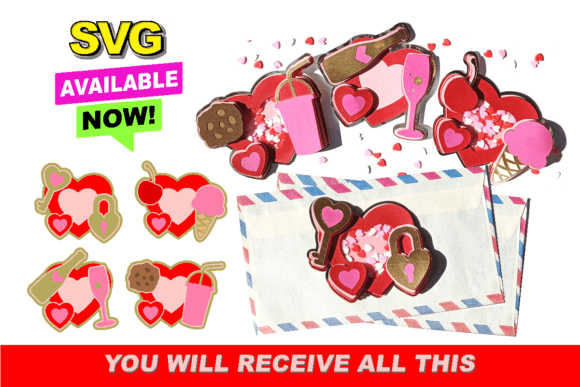
Imagine you’ve downloaded a set of 3D SVG heart stickers to personalize some gift boxes. You open the ZIP file but don’t read the included guide. You load one of the SVGs into your software, only to find out later that the layers aren’t correctly separated. As a result, the hearts come out flat instead of 3D. By taking the time to explore the folder and follow the setup instructions, you could have avoided this issue entirely and created stunning dimensional stickers with ease.
Common Mistakes to Avoid When Applying 3D SVG Stickers
- Skipping the weed step: Removing excess vinyl or decal backing before applying the sticker is crucial. Leaving bits behind can ruin the look and feel of your final product.
- Applying without proper tools: Use a squeegee or applicator tool to press the sticker firmly onto the surface. This improves adhesion and prevents air bubbles.
- Ignoring surface preparation: Make sure the area where you're placing the sticker is clean, dry, and free of dust. Even a small smudge can affect how the sticker looks once applied.
- Not letting the sticker cure: After applying, wait a few minutes for the adhesive to bond. Rushing the process can cause misalignment or lifting.
These steps might seem minor, but they significantly impact the quality of your finished stickers. For example, failing to clean the surface before applying a 3D SVG sticker on a mug could result in it not sticking properly and falling off during use. Similarly, skipping the curing time might lead to the sticker coming loose when you try to remove the transfer tape too soon.
Practical Tips for Better Results
- Use high-quality materials: Invest in good adhesive vinyl or printable decal paper. Lower-quality options may tear easily or not stick well, especially on curved or textured surfaces.
- Test before you commit: Always do a trial run on a scrap piece of material before moving to your final project. This helps identify potential issues early and saves time in the long run.
- Follow layer guidelines: If the 3D SVG includes multiple layers for depth, ensure each layer is cut and applied separately. Misaligned layers can flatten the intended 3D effect.
- Work in a clean, well-lit space: Precision matters when handling intricate designs. A cluttered workspace increases the risk of mistakes and lowers efficiency.
By adopting these practices, you can enhance both the aesthetic appeal and functionality of your Valentines Day Stickers 3D SVG. Whether you're a hobbyist making personalized cards or a small business owner creating themed packaging, attention to detail makes a big difference.
What to Check Before Making a Purchase or Download
Before buying or downloading a 3D SVG sticker set, ask yourself the following questions:
- Does the package include a compressed folder with all necessary files?
- Are the files compatible with my cutting machine and software?
- Is the recommended material (adhesive vinyl or decal paper) specified clearly?
- Do I understand how to assemble the 3D layers correctly?
- Are there tutorials or guides provided for beginners?
Answering these questions upfront can help prevent costly errors and ensure that your investment delivers the best results. If you're unsure about anything, reach out to the seller or consult online forums and communities for advice tailored to your specific needs.
Why It’s Worth the Effort
Creating with Valentines Day Stickers 3D SVG isn’t just about aesthetics; it’s also about communication and presentation. These stickers can elevate your message, whether you're expressing love through handmade cards or branding a product for the holiday season. Their three-dimensional nature adds a sense of care and craftsmanship that flat designs simply can't match.
For marketers and entrepreneurs, using 3D SVG stickers can differentiate your products in a crowded market. For educators and bloggers, they provide engaging visuals that resonate with audiences. And for hobbyists, they offer a fun challenge that leads to more satisfying creations.
Better Approach Example:
Instead of rushing to apply a 3D SVG sticker immediately after cutting, take time to lay out each layer on a scrap sheet. Ensure they align properly and adjust if needed. Only then proceed to apply them to your final project. This method guarantees accuracy and minimizes the chance of redoing entire sections due to misalignment.
Conclusion
Valentines Day Stickers 3D SVG are a powerful tool in the hands of creative individuals and businesses alike. However, success with these stickers depends on more than just having the right design—you must also use the correct materials, understand your machine's capabilities, and follow best practices for application. By avoiding common pitfalls and planning ahead, you can ensure your stickers turn out beautifully and serve their purpose effectively.
Remember, the key to great results lies in thoughtful preparation and execution. Whether you're new to crafting or a seasoned pro, taking the time to learn and apply these tips will make your experience with 3D SVG stickers much more rewarding.